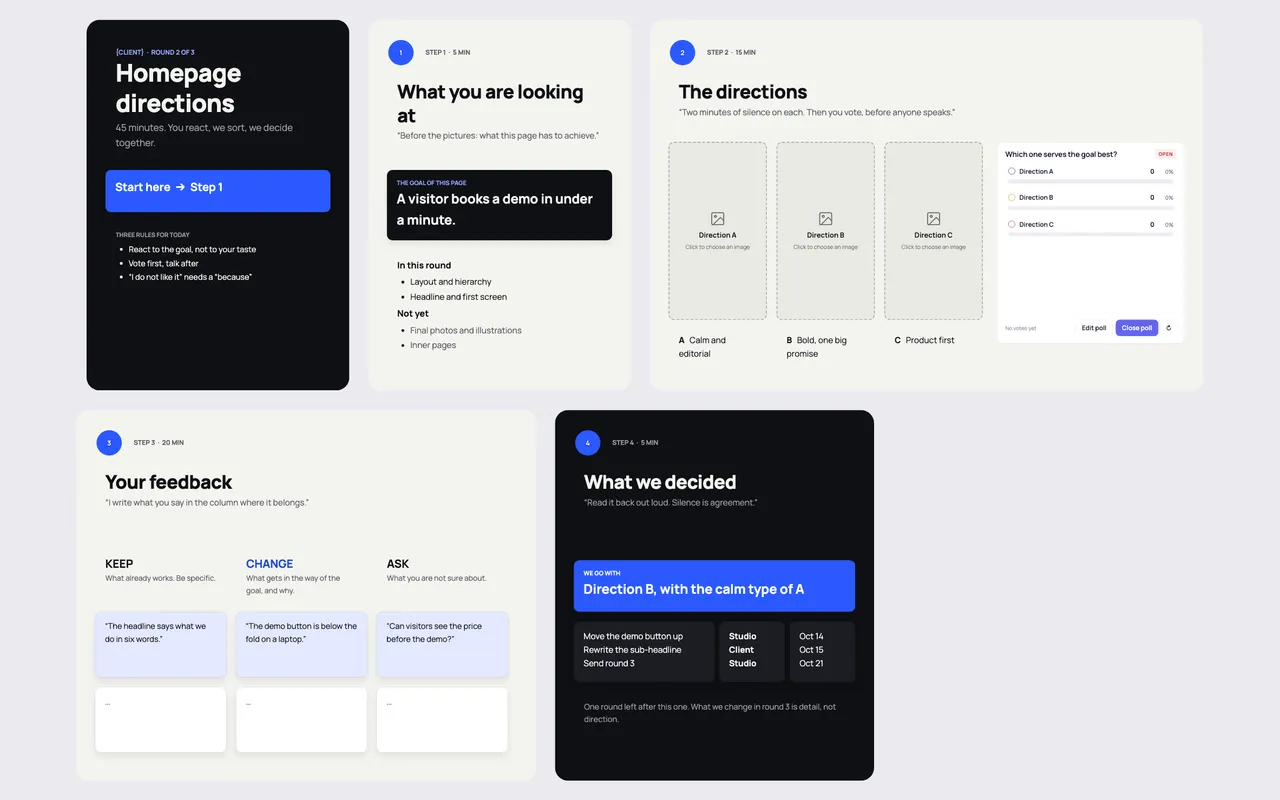
A client feedback round is a 45-minute design review with a fixed order: remind everyone what the page must achieve, show two or three directions, let the client vote before anyone speaks, sort the feedback into keep, change and ask, then read the decisions back with dates. It replaces the email thread where twelve opinions arrive over a week.
Why design reviews with clients go wrong
Most client reviews fail for the same three reasons. The client reacts to taste instead of the goal ("I don't like blue"). The loudest person in the room speaks first and everyone else aligns. And nobody writes down what was decided, so round three reopens round two.
The Feedback round template in Coommit is built to block each of those. It opens with the goal of the page, it asks for a vote before discussion, and it closes with decisions that have an owner and a date.
What is on the board
The template has three rules at the top, written for the client: react to the goal, not to your taste; vote first, talk after; "I don't like it" needs a "because". Then four steps:
- What you are looking at (5 min). The goal of the page in one sentence, for example "a visitor books a demo in under a minute", and what is in this round versus not yet, so nobody comments on photos in a layout round.
- The directions (15 min). Two or three directions side by side, each with a one-line name ("calm and editorial", "bold, one big promise", "product first"). Two minutes of silence on each, then a poll: which one serves the goal best? The poll is anonymous, so the decision maker cannot sway the others before they vote.
- Your feedback (20 min). Three columns: keep (what already works, be specific), change (what gets in the way of the goal, and why), ask (what you are not sure about). You type what the client says into the right column as they talk.
- What we decided (5 min). The chosen direction, the changes, and who does each by when. The board's rule: read it back out loud, silence is agreement.
How to run a client design review, step by step
- Set the round before the call. Write the page goal and what this round covers. If you skip this, the client will review everything at once.
- Present each direction briefly, then stay quiet. Two minutes of silence per direction feels long. It is where the useful reactions form.
- Open the vote before the discussion. With an anonymous poll, you learn what the room actually thinks, not what the most senior person thinks.
- Sort feedback as you hear it. Ask "is that a keep, a change or a question?" The act of sorting turns vague reactions into actionable ones.
- Close with dated decisions and the number of rounds left. "One round left after this one. What we change in round 3 is detail, not direction."
Tips from agencies that run tight reviews
- Review against the goal every time. When a comment starts with "I", bring it back to "does it help the visitor book a demo?".
- Limit each round's scope. Layout and hierarchy first, final photography later. Clients comment on what they see, so show only what you want reviewed.
- Keep the feedback on the design, not in an email. When the directions, the vote and the notes live in one room, the next round starts where this one ended.
- Use one room per client. Put the review board next to the project plan in a client portal room, and the whole project history stays in one link.
Running the review live in Coommit
Coommit is a shared workspace where teams meet on video around their docs, designs and websites. The room stays available after the call. For a design review, the directions sit on the canvas as images or as live Figma files, the client joins the video call inside the room from a link (no account, no download), votes in the poll, and watches their comments land in the right column.
You can open a live website or a staging link in a shared browser that everyone sees and can use at once, which is handy when the review is about a real page rather than a mockup. After the call, the built-in AI writes a recap with the decisions and the tasks, and you can send it to Slack or Notion. The Feedback round template is available when you create a new room.
For a wider look at how agencies present work, see how Coommit compares with Zoom and Miro for client calls. Plans are on the pricing page; guests are free.