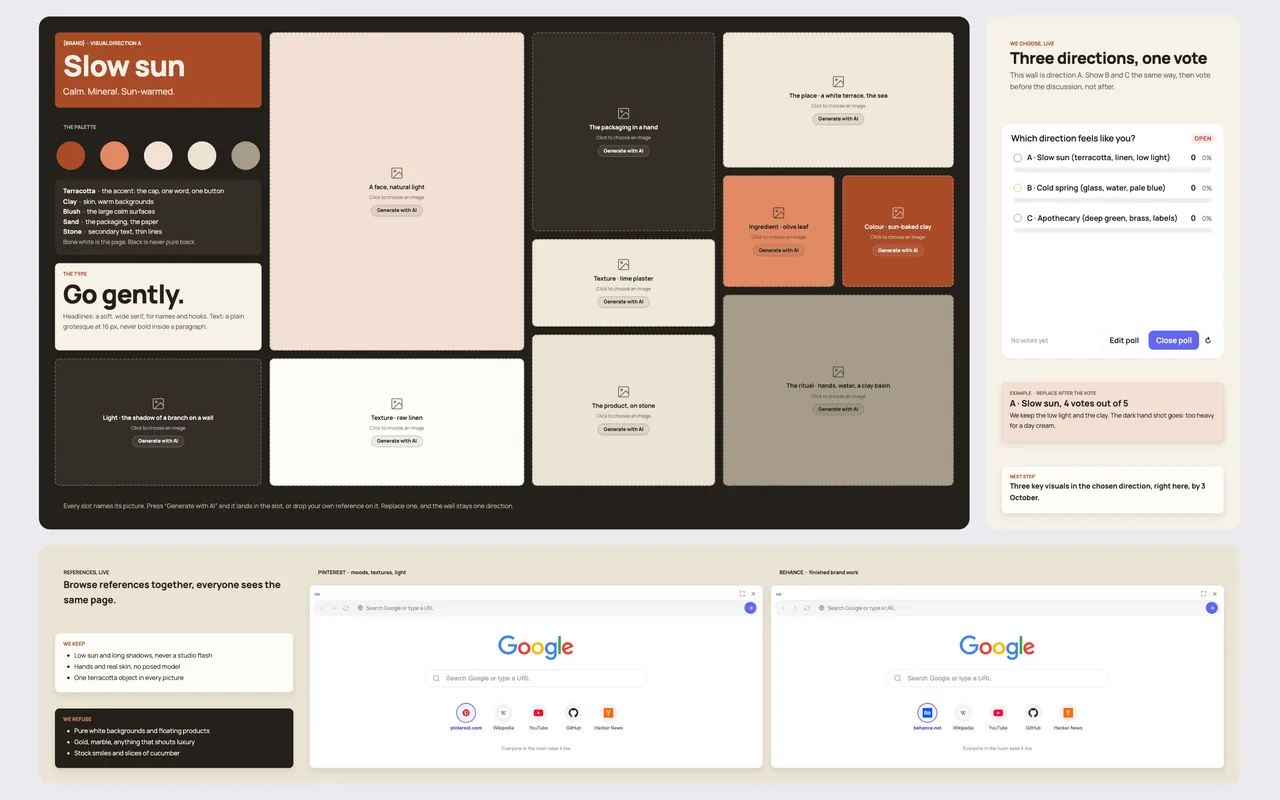
A moodboard template for client work is a wall that makes a visual direction concrete enough to decide on: a named direction, a palette with a role for each colour, the type, ten images that each say what they are, what you keep and what you refuse, and a vote. The Moodboard template in Coommit is built to pick a direction with the client on the call, not by email a week later.
Why most moodboards do not lead to a decision
A moodboard sent as a PDF gets a reaction to individual pictures ("I love the third one") instead of a decision about a direction. The client cannot say why, the team cannot tell which qualities to keep, and the next round starts from scratch.
The fix is structure. A direction needs a name and three adjectives, every image slot needs to say what it stands for (light, texture, the product in a hand), and the choice needs to happen in front of everyone, before the discussion bends it.
What is on the board
- The direction, named. For example "A · Slow sun: calm, mineral, sun-warmed".
- The palette, with jobs. Each colour has a role: the accent for one word or one button, the warm backgrounds, the large calm surfaces, the packaging, the secondary text.
- The type. The headline face and the text face, with a rule ("a plain grotesque at 16 px, never bold inside a paragraph").
- Ten named image slots. Light, a face in natural light, a texture, the packaging in a hand, the product on stone, the place, an ingredient, a colour, the ritual. Each slot can take your own reference, or you can press "Generate with AI" and the image lands in the slot from the prompt written on it.
- We keep / we refuse. Two short lists that make the direction transferable to the next designer: "low sun and long shadows, never a studio flash" versus "pure white backgrounds and floating products".
- References, live. Two shared browsers, suggested on Pinterest and Behance, to browse references together during the call.
- We choose, live. Show directions B and C the same way, then a poll: which direction feels like you? The vote comes before the discussion.
- Next step. Three key visuals in the chosen direction, with a date.
How to run a moodboard session with a client
- Prepare two or three directions as separate walls, each with its name, palette, type and ten images.
- Walk through each direction for three minutes, starting with the name and the adjectives, not the pictures.
- Open the vote before anyone comments. The client team votes on directions, not images.
- Discuss what to keep and refuse from the winning direction, and borrow one quality from a losing one if the group asks for it.
- Close with the next step and its date: usually three key visuals in the chosen direction.
Tips for brand and creative teams
- Name every image slot. "Texture · raw linen" is a decision; an unnamed picture is a mood.
- Give each colour one job. A palette without roles gets used everywhere at once.
- Write the refusals. The "we refuse" list saves more rounds than the images do.
- Keep the moodboard in the project room. It becomes the reference for every later client feedback round.
Running it live in Coommit
Coommit is a shared workspace where teams meet on video around their docs, designs and websites. The room stays available after the call. The client joins the video call inside the room from a link, with no account, sees the three walls, votes in the poll and browses references with you in the shared browser. After the call, the built-in AI writes the recap with the chosen direction and the next steps, which you can send to Slack or Notion.
The Moodboard template is available when you create a new room. See the pricing page for plans; guests are free.