A client kickoff meeting template gives the first hour of a project a fixed shape: one goal everyone signs, one person who decides on each side, a written list of what is in and out of scope, a timeline with the client's own deadlines in it, and three working habits. Leave the call with that page and most disputes of the next three months never start.
What is a client kickoff meeting?
A client kickoff meeting is the first working session after the contract is signed. Its job is not to present your agency again. Its job is to turn a signed proposal into shared decisions that both teams can point to later: why the project exists, who has the final word, what the budget does not cover, and which dates depend on the client.
Agencies usually lose projects in the gaps a kickoff should close: feedback that arrives from four people at once, a "small" extra page nobody priced, copy that shows up three weeks late and moves the launch. The template below is built around those gaps.
What is on the board
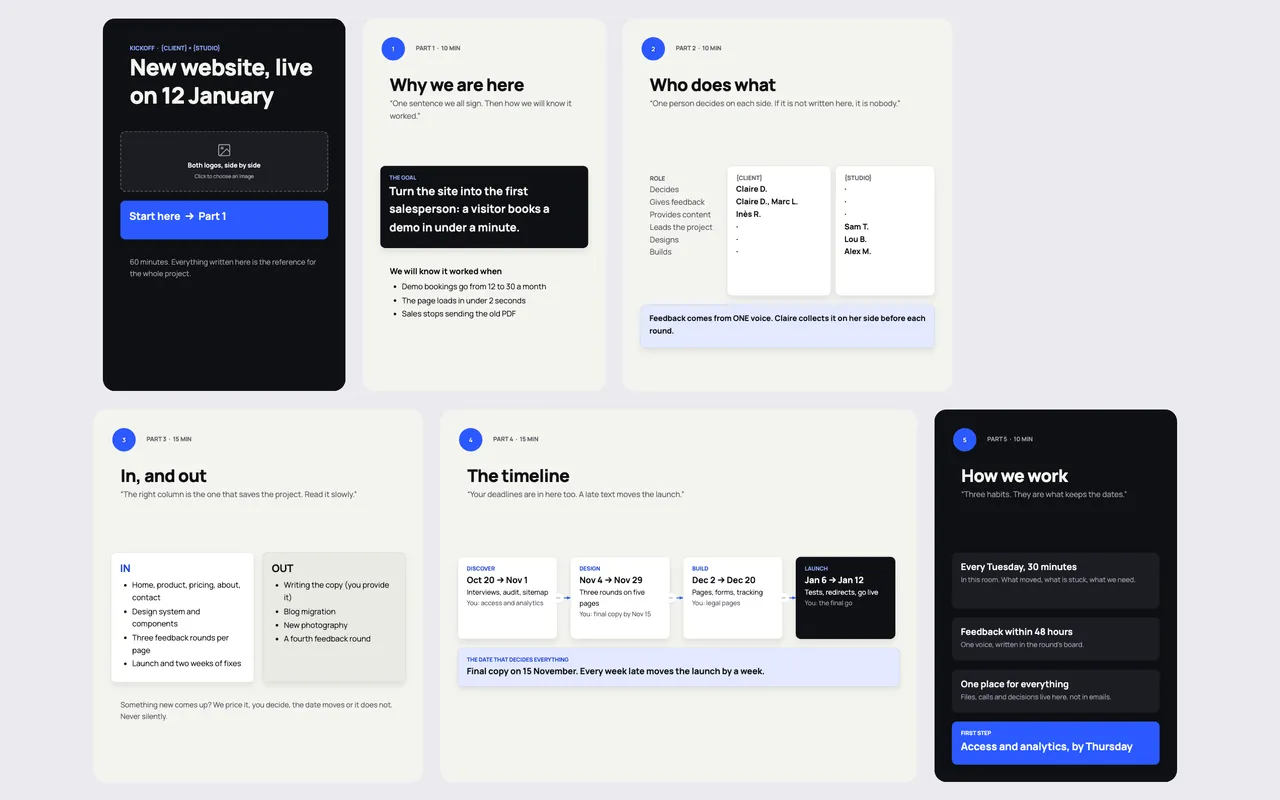
The Project kickoff template in Coommit lays the hour out in five parts, left to right, each with its time box:
- Why we are here (10 min). One sentence of goal that everyone signs, and how you will know it worked. In the example, the goal is "turn the site into the first salesperson" and the proof is demo bookings going from 12 to 30 a month.
- Who does what (10 min). A grid of roles for both sides: who decides, who gives feedback, who provides content, who leads, who designs, who builds. The rule written under it: feedback comes from one voice.
- In, and out (15 min). Two columns. The right one, what is out of scope, is the one that saves the project, so the board asks you to read it slowly. Anything new gets priced, the client decides, and the date moves or it does not. Never silently.
- The timeline (15 min). Four phases with dates, and under each one what the client owes you. One card names the date that decides everything, for example the final copy.
- How we work (10 min). Three habits: a weekly 30-minute call in the same room, feedback within 48 hours from one voice, and one place for files, calls and decisions.
The board closes on a single first step with an owner and a date.
How to run the kickoff, step by step
- Before the call, fill in what you already know from the proposal: the goal sentence as a draft, the scope columns, the phases. Leave the names empty. The client fills those in live.
- Open with the goal and ask them to rewrite it. A goal the client wrote in their own words is a goal they defend in round three.
- Fill the roles grid together. If two people claim "decides", stop there and settle it. It is the cheapest moment this project will ever have to settle it.
- Read the out-of-scope column out loud. Ask: "Is anything here a surprise?" Every surprise you hear now is a change request you do not have to fight later.
- Put their deadlines on the timeline, not only yours. Content, access, approvals. Circle the one that moves the launch.
- End on the first step, with a name and a date, and book the weekly call in the same room.
Tips that make it work
- Keep it to 60 minutes. A kickoff that runs two hours turns into a design session. Park design questions on a note for the first review.
- Write decisions where everyone sees them. Typing into a shared board during the call beats sending minutes the next day: nobody can say later that they did not see it.
- Use the same room for the whole project. The kickoff board becomes the reference page. When a scope question comes up in week six, you open the room and scroll left.
- Pair it with a client space. Once the kickoff is done, a client portal room keeps the planning, the brief and the decisions in one link.
Running the kickoff live in Coommit
Coommit is a shared workspace where teams meet on video around their docs, designs and websites. The room stays available after the call. For a kickoff, that means the video call opens inside the same room as the board: you present the timeline, the client edits the roles grid, and nobody switches tabs.
Clients join from a link, with no account and no download. You can pull the signed brief from Google Drive onto the board, open the current site in a shared browser everyone can use at once, and after the call the built-in AI writes a recap with the decisions and the tasks, which you can send to Slack or Notion. The Project kickoff template is available when you create a new room.
If you run your client meetings in Zoom and your boards in Miro today, our comparison of Zoom alternatives for client meetings explains when one room is the better fit, and when it is not. Agencies can see how the whole client journey works on the pricing page: one plan, and guests are free.