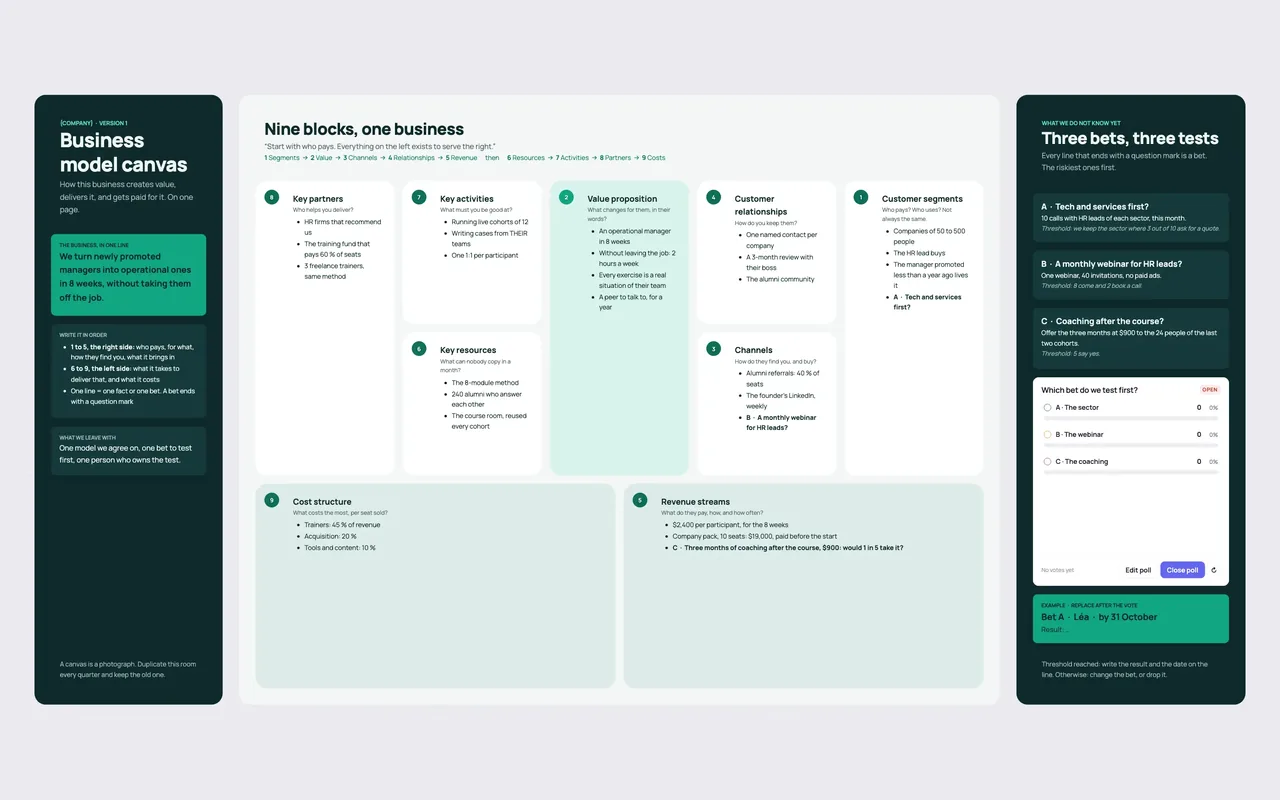
A business model canvas template puts a whole business on one page: who pays, for what, how they find you, what it brings in, what it takes to deliver, and what it costs. The Business model canvas template in Coommit numbers the nine blocks in the order they are meant to be filled, shows a worked example in each one, and turns the three riskiest lines into tests your team votes on.
What is the business model canvas?
The business model canvas was created by Alexander Osterwalder with Yves Pigneur and popularized by their 2010 book, Business Model Generation. It fits on one sheet and forces a link between customers and costs.
The five blocks on the right describe the customer and the value they get; the four on the left, what it takes to produce it. The classic mistake is to start on the left, with key partners: you end up describing the company instead of a business that makes money.
The nine blocks, in the order to fill them
Start on the customer side, on the right:
- Customer segments: who pays, and who uses? It is not always the same person.
- Value proposition: what changes for them, in their words?
- Channels: how do they find you, and how do they buy?
- Customer relationships: how do you keep them?
- Revenue streams: what do they pay, how, and how often?
- Key resources: what could a competitor not copy in a month?
- Key activities: what must you be good at?
- Key partners: who helps you deliver?
- Cost structure: what costs the most, per unit sold?
Two rules hold the grid together. Everything on the left exists to serve the right. And one line is one fact or one bet: a bet ends with a question mark.
A business model canvas example: a training studio for new managers
The template arrives filled in, so every block shows what a good line looks like: a number, a name, a price. The business in one line: "We turn newly promoted managers into operational ones in 8 weeks, without taking them off the job."
- Segments: companies of 50 to 500 people. The HR lead buys; the newly promoted manager lives it.
- Value: an operational manager in 8 weeks, 2 hours a week, exercises from their own team, a peer for a year.
- Channels: alumni referrals, which bring 40% of seats, and the founder's weekly LinkedIn posts.
- Relationships: one named contact per company, a 3-month review with the manager's boss, and the alumni community.
- Revenue: $2,400 per participant, or $19,000 for a 10-seat company pack paid before the start.
- Resources: the 8-module method and 240 alumni.
- Activities: live cohorts of 12, cases from the participants' teams, one 1:1 each.
- Partners: HR firms that recommend the program, a training fund that pays for 60% of seats, and 3 freelance trainers.
- Costs: trainers take 45% of revenue, acquisition 20%, tools and content 10%.
From canvas to tests: the three riskiest bets
The template pulls out what nobody can prove yet: every line that ends with a question mark is a bet, and the three riskiest become tests with a threshold set in advance.
- A. Tech and services first? Ten calls with HR leads in each sector this month. Keep the sector where 3 out of 10 ask for a quote.
- B. A monthly webinar for HR leads? One webinar, 40 invitations, no paid ads. It works if 8 people come and 2 book a call.
- C. Coaching after the course? Offer three months of coaching at $900 to the 24 people from the last two cohorts. It works if 5 say yes.
A poll picks the first bet to test, and that bet leaves the call with an owner and a date. Threshold reached: write the result on the line. Otherwise, change the bet or drop it.
How to fill in a business model canvas, step by step
- Write the business in one line. If it does not fit in one sentence, the canvas will be vague.
- Fill blocks 1 to 5 with facts: numbers, names, prices.
- Fill blocks 6 to 9, and check that every line serves a block on the right.
- Pick the three riskiest bets and write a test and a threshold for each one.
- Vote on the first test, then give it an owner and a date.
Tips for a canvas that leads to decisions
- Numbers beat adjectives. "Companies of 50 to 500 people" helps you decide. "SMBs" does not.
- Separate who pays from who uses. The HR lead who signs and the manager who attends want different things.
- Connect it to execution. Rank the tests with an impact effort matrix, then set the quarter's goals with an OKR template.
Running the canvas live in Coommit
Coommit is a shared workspace where teams meet on video around their docs, designs and websites. The room stays available after the call. Your team fills in the nine blocks together during the video call, the poll picks the first test, and the canvas is still there for the next review.
Co-founders and advisors join free from a link, with no account and no download. After the call, the built-in AI writes a recap with the decisions and the tasks, which you can send to Slack or Notion. The Business model canvas template, like the other meeting templates, is available when you create a new room. See Coommit for product teams and the pricing: $29 per host per month, with a 7-day free trial and no card required.