A coaching session template gives a one-to-one hour four steps: review what happened since last time, name today's topic in the client's own words, explore it with open questions, and end on three commitments with dates. The Coaching session template in Coommit keeps every session in the same client room, so nothing is lost between two calls.
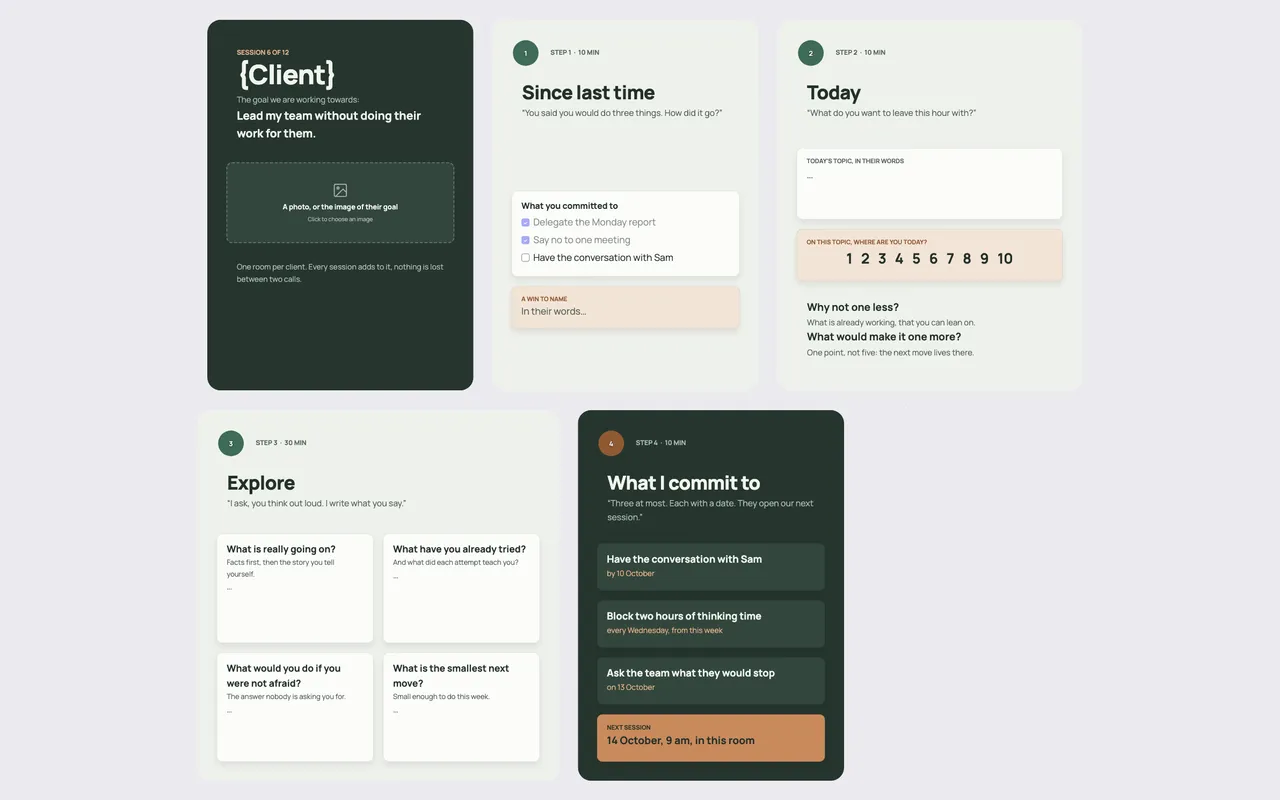
How to structure a coaching session
Most effective coaching sessions share the same arc. They start by closing the loop on the last session's commitments, then agree on what the client wants to leave this hour with, spend most of the time exploring, and finish with small, dated actions. The structure below follows that arc with time boxes that fit a 60-minute session.
What is on the board
- The programme at a glance. "Session 6 of 12", the client's name and the goal they are working towards, for example "lead my team without doing their work for them", plus a slot for an image of that goal.
- Step 1 · Since last time (10 min). The commitments from the previous session, and a box to name a win in the client's words.
- Step 2 · Today (10 min). Today's topic in their words, and a scale from 1 to 10: on this topic, where are you today? Two follow-up questions: why not one less (what already works), and what would make it one more.
- Step 3 · Explore (30 min). Four questions with room to write: what is really going on (facts first, then the story you tell yourself); what have you already tried; what would you do if you were not afraid; what is the smallest next move.
- Step 4 · What I commit to (10 min). Three commitments at most, each with a date. They open the next session.
- Next session. The date and time, in this room.
How to run the session, step by step
- Open the client's room a few minutes early; last session's commitments are already on the board.
- Go through each commitment: done, partly done, not done. Ask what each taught them before moving on.
- Ask what they want to leave with today, and write it in their words, not yours.
- Use the scale to find the next move. "One point, not five: the next move lives there."
- Spend half the hour exploring. You ask, they think out loud, you write what they say on the board so they can see it.
- Close with three commitments and dates, and confirm the next session.
Tips for coaches
- Write in the client's words. People commit to sentences they said, not to your paraphrase.
- Keep commitments small. "Block two hours every Wednesday, from this week" beats "work on strategy".
- One room per client. The room becomes the client's file: every session, exercise and commitment, in order. It also makes the next session's opening obvious.
- Add exercises when they help. The wheel of life template for a first session, the GROW model template for a decision.
Running sessions in Coommit
Coommit is a shared workspace where teams meet on video around their docs, designs and websites. The room stays available after the call. For a coach, that means each client has a room where the video session, the notes, the exercises and the commitments live together. Clients join from a link, with no account and no download.
After the session, the built-in AI writes a recap with the decisions and next steps, saved in the room's history. Calls can be recorded with live transcription in English and French. With the Calendly connection, a booking can create the client's room and invite them. The Coaching session template is available when you create a new room. See Coommit for coaches and consultants and the pricing.